What is BPMN? The 20% of the Spec You'll Actually Use
BPMN - Business Process Model and Notation - is the OMG standard for diagramming business processes. It defines a visual language (rectangles for tasks, diamonds for gateways, circles for events) and an XML serialisation. Modern BPMN engines treat the diagram as something directly executable - the same model a business analyst draws is what the engine runs.
The BPMN 2.0 spec defines well over a hundred symbols. The honest truth is that you'll use about fifteen of them in 90% of real processes. This post walks through that core, then explains how a BPMN model actually executes.
What BPMN is good at
BPMN models the flow of work over time: who or what does the next step, what triggers it, what happens if it times out, and what runs in parallel. It's the right tool when:
- A piece of work spans multiple actors - a service, a human, an external system.
- It runs over wall-clock time - minutes, hours, weeks.
- It needs to survive crashes, restarts, and retries without losing its place.
- The flow itself is a thing the business owns - onboarding, claims processing, an approval chain - and changes over time.
If your "process" is a synchronous function call that returns in milliseconds, BPMN is overkill. If your "process" reaches a step labelled "wait two business days for the customer to upload a document", BPMN earns its keep.
The core elements
A BPMN process is a directed graph of flow elements connected by sequence flows (the arrows). The flow elements come in three families.
Events - circles
Events represent something that happens. Three positions on a flow:
- Start events - how the process begins.
- End events - how it terminates.
- Intermediate events - something in the middle: wait for a message, throw a signal, raise an error.
Each event has a trigger type. The ones you'll meet in real processes:
| Trigger | What it means | |
|---|---|---|
 | None | Plain start/end with no specific trigger. |
 | Message | Wait for a named message correlated to this instance. |
 | Signal | Broadcast or wait for a named signal (one-to-many). |
 | Timer | Fire after a duration, on a date, or on a cycle. |
 | Error | Throw or catch a named error - for failure handling. |
 | Escalation | Like an error, but typically non-interrupting (the work continues while someone is alerted). |
 | Compensation | Trigger compensating actions when something has to be "undone". |
 | Terminate | An end event that immediately stops the entire process. |
Boundary events sit on the edge of a task or sub-process and intercept it - "if this task takes longer than 24 hours, fire a timer". They come in interrupting (cancel the task) and non-interrupting (run alongside) variants.
The events reference covers every trigger and position combination the engine implements, including which boundary events are non-interrupting and how error and escalation events bubble up through nested scopes.
Tasks - rounded rectangles
A task is a unit of work. The task type tells the engine who or what does it:
| Task | Performed by | |
|---|---|---|
 | Service task | An automated worker - typically code (a Temporal worker, a polled HTTP worker, etc.). |
 | User task | A person, via your UI. The engine holds the token until the task is claimed and completed. |
 | Script task | A short inline expression - in QuantumBPM, written in FEEL. |
 | Business-rule task | Calls a DMN decision and writes the result back into process variables. |
  | Send task / Receive task | Send or receive a message. |
  | Manual task / Generic task | Untracked manual work / no specific semantics - useful for documenting steps the engine doesn't run. |
The tasks reference documents the runtime contract behind each type: what the engine hands a worker, what it expects back, and how retries and multi-instance execution behave.
Gateways - diamonds
Gateways control branching and merging:
| Gateway | Behaviour | |
|---|---|---|
 | Exclusive (XOR) | One outgoing path is taken based on a condition. The default if/else of BPMN. |
 | Parallel (AND) | All outgoing paths run concurrently. On join, all incoming must arrive. |
 | Inclusive (OR) | Any number of outgoing paths can run, based on per-flow conditions. |
 | Event-based | Wait for one of several events. Whichever fires first wins. |
The gateways reference goes deeper on join semantics, which is where most modelling bugs actually live - especially the inclusive join, where the engine has to decide how many tokens it is still waiting for.
Three families. About fifteen meaningful elements. That covers most processes you'll actually model.
Structure: sub-processes and call activities
Real processes get nested. BPMN gives you three ways to compose:
| Element | What it is | |
|---|---|---|
 | Embedded sub-process | A group of elements drawn inline, sharing the parent's data. |
 | Call activity | An invocation of another process definition. The called process runs as its own scope and can be reused across processes. |
 | Event sub-process | Sits inside a parent scope and triggers on an event (a message, an error, a timer). Useful for "if anything goes wrong, do this". |
Sub-processes are also where you attach boundary events for scoped error handling, escalation, and compensation. The structure reference covers how scopes nest, which variables a child can see, and what a call activity does with the parent's data.
A small example
Here's the spine of an order-fulfilment process modelled in QuantumBPM:
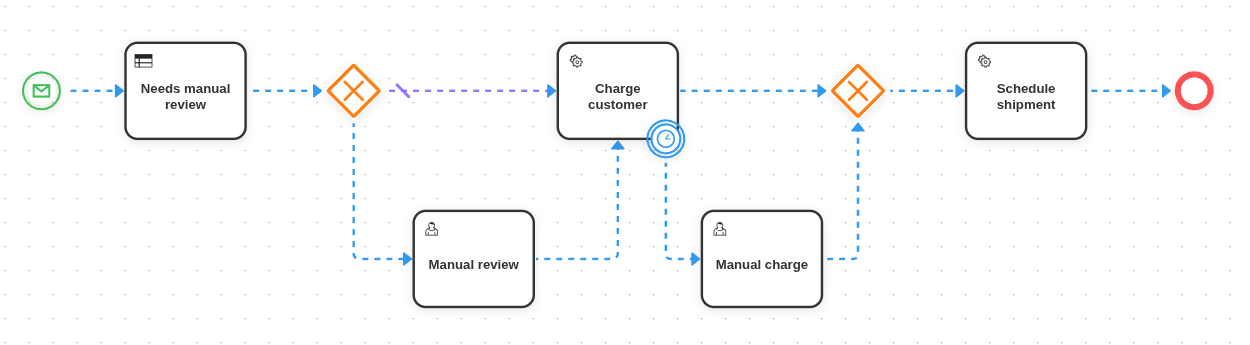
Reading left to right:
- Start event (message: "OrderPlaced") - the process kicks off when an order arrives.
- Business-rule task - call a DMN decision to decide whether the order needs manual review.
- Exclusive gateway - branch on the decision result.
- No review needed → continue.
- Review needed → user task (a human approves or rejects), then continue.
- Service task - charge the customer.
- With a timer boundary event - if charging takes more than 5 minutes, escalate to manual charge.
- Service task - schedule shipment.
- End event.
That's an end-to-end process using start/end, a business-rule task, a service task, a user task, an exclusive gateway and a timer boundary event. Six element types - and you can already model surprisingly complex real-world flows.
What "executing a BPMN model" actually means
The visual model is just one face of BPMN. Underneath, every BPMN element has well-defined runtime semantics: what it does when a token arrives, what it produces, what it waits for. A BPMN engine is the runtime that gives those semantics a concrete implementation.
In QuantumBPM, that runtime is built on Temporal - a durable execution platform. Each process instance becomes a Temporal workflow. The practical consequences:
- Crashes are non-events. Workflow state is event-sourced, so a worker restart resumes the instance exactly where it stopped - no recovery code to write.
- Long-running is normal. A timer event waiting two weeks doesn't pin a thread or a database row in a non-obvious way. Durability is the default.
- Every step is recorded. The instance history is replayable - the same property that lets us offer a "scrub the timeline" UI for running and completed instances.
What we layer on top is the BPMN-specific machinery: the element catalog with full validation, scope trees for compensation/escalation/error bubbling, a concurrency-safe interpreter for parallel and inclusive gateways, and the operational tooling - incidents, message/signal correlation, token modification, version migration.
Where to go from here
- How a BPMN engine works - the natural next step: tokens, process state, workers, and seven things worth building on an engine.
- What is DMN? - the companion piece on decision modelling.
- BPMN vs. DMN - how the two standards complement each other.
- BPMN overview - what's supported in the QuantumBPM engine and the modeler.
- Element reference - events, tasks, gateways, structure and sequence flows, one page each.
- Messages and signals - correlation keys, buffering for late subscribers, and when to broadcast instead.
- Operations - resolving incidents, inspecting history, and cancelling work on live instances.
- External workers - how to implement service tasks in your own language.
If you want to draw and run a process end-to-end, start at the platform overview.